Code is easier to follow than configuration: comparing a sample blog in Web Origami and Eleventy
This post series is for people who want to build or rebuild a site.
You may have heard of Eleventy, a popular static site generator, and maybe heard it’s simple to use. To evaluate that simplicity, I’ll compare a sample blog in Eleventy to the same blog in Web Origami. This will be similar to my comparison last year of Astro and Origami.
If you’re shopping for a site-building tool, I hope this series can help inform your decision. If you already use Eleventy, I’m happy you’ve found something that works for you. As I said last year, anything that makes people more likely to create a site is fantastic.
A difference in strategy
Eleventy works like most static site generators: you run the tool, it searches inside your project for certain folders and files, then processes them to create an output directory with your site’s HTML pages and other resources. You influence this process through configuration, setting various parameters to adjust what Eleventy does. You generally set those parameters through JavaScript files, although the emphasis in those files is on defining parameterized objects or enabling plugins.
In Web Origami you focus on defining the site you want with code. You do this in standard JavaScript or the smaller Origami dialect of JavaScript, which is essentially JavaScript expressions with embedded file paths. The code does whatever you tell it to do. In this case, it defines a blog site’s tree of resources, transforming the markdown posts into browsable HTML and a feed.
This difference between configuration and coding is similar to the difference between working with numbers in Intuit QuickBooks and Microsoft Excel. The former is configured; the latter lets you calculate whatever you want.
Configuration is generally sold as simpler than coding, and most people intuitively feel that should be the case. But I believe that, for making sites, coding is superior in four specific ways:
- Code is easier to follow than configuration.
- Code is more coherent than configuration.
- Code is more expressive than configuration.
- Code is more concise than configuration.
Configuration can certainly let you achieve impressive results in complicated domains that you probably couldn’t code yourself, but sites just aren’t that complicated. It’s actually easier to code your own site from scratch than to create one by configuring a tool.
Experiment setup
I copied Eleventy’s recommended starting point for new blogs, the eleventy-base-blog template project, studied that until I felt I understood its construction, then ported it to Web Origami. This gave me two versions of the same blog:
- Eleventy version: Source code and Demo
- Origami version: Source code and Demo
Both demos are about as close as I can easily make them. For a cleaner comparison, I made a few modifications to the original Eleventy project:
- The original project had an introductory message with instructions to remove it, so I removed it.
- The original used a plugin for image optimization, but reproducing the effects of that would complicate this analysis, so I removed it.
- I removed the original’s XSLT stylesheet for the blog feed, as XSLT is being deprecated by Chrome; WebKit and Gecko will likely follow. (I’m not saying the deprecation is warranted, but given the state of things I felt the stylesheet was a distraction.)
Beyond that I tried to port all observable behavior; some minor differences remain. For example, the Eleventy project uses PrismJS for syntax highlighting while the Origami solution uses the slightly different HighlightJS. With more work, the sites could be made even more identical, but I don’t think that would change the overall results of this experiment.
Code is easier to follow than configuration
With two versions of the same project in hand, let’s start evaluating them by considering which version is easier to follow. If you’re coming fresh to the project, can you answer the question: How does it work?
That can be a hard question, so let’s start with a simpler one: What is calling what?
For template projects like eleventy-base-blog, the README typically instructs you to build the site with a command like npm run build. That’s the main entry point to the build process. I tried to search forward from there and follow links to related files.
I got stuck.
- The build command for
eleventy-base-blogisnpx @11ty/eleventy. That invokes Eleventy, but beyond that point it’s not obvious how Eleventy does what it does. - A promising
eleventy.config.jsfile makes specific references to a folder calledcontentand a file calledfilters.js, but there I hit a dead end. - I ended up searching through the entire project looking for source files, then looking in those for references to other source files.
I constructed a partial map of what calls what:
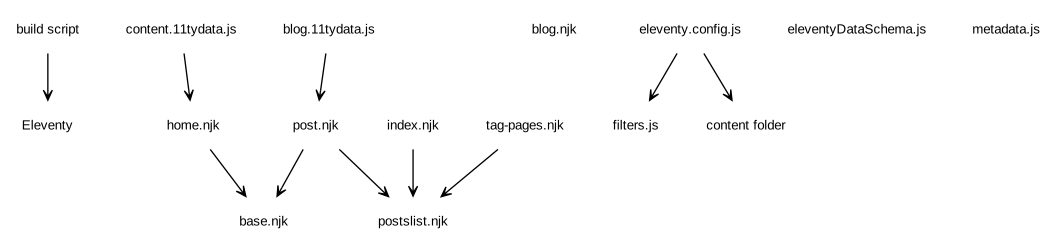
The files floating in space aren’t directly referenced by any other files. Some of the file names suggest what roles those files play, but it was still mysterious to me how they actually played those roles.
I eventually found an Eleventy documentation page called Order of Operations providing an “advanced” description of most (but not all) of what was going on. I then had Claude Code guess/explain how the remaining files worked. This clarified that, e.g., Eleventy lets you register JavaScript functions as “filters” you can call from templates. I hadn’t been able to work out for myself that many of the .njk files were invoking code in filters.js.
I was then able to flesh out the above dependency diagram, adding what I understand to be the implicit connections as dashed lines:
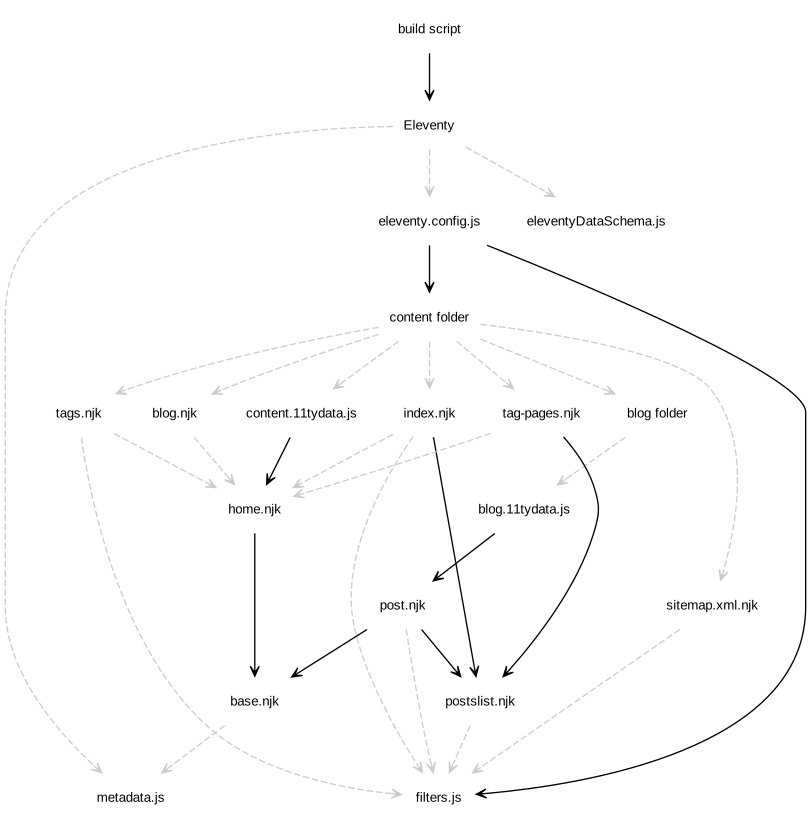
Many of the connections in this project are dashed lines representing “action at a distance” — if you don’t already know how the system works, such connections are hard to discover or intuit. This may be acceptable for something you will use all the time, but it certainly does make learning the system (or coming back to it) more difficult.
Let’s now try to answer the “What is calling what?” question for the Web Origami blog, again starting from the build command:
ori copy src/site.ori, clear files:build
Even if the meaning of that command is unclear, you can still see an explicit reference to the file site.ori. If you open that file, you’ll see it contains references to all the files it calls.
You can repeat that process, following links from one file to another, to recover the entire graph of source file calls:
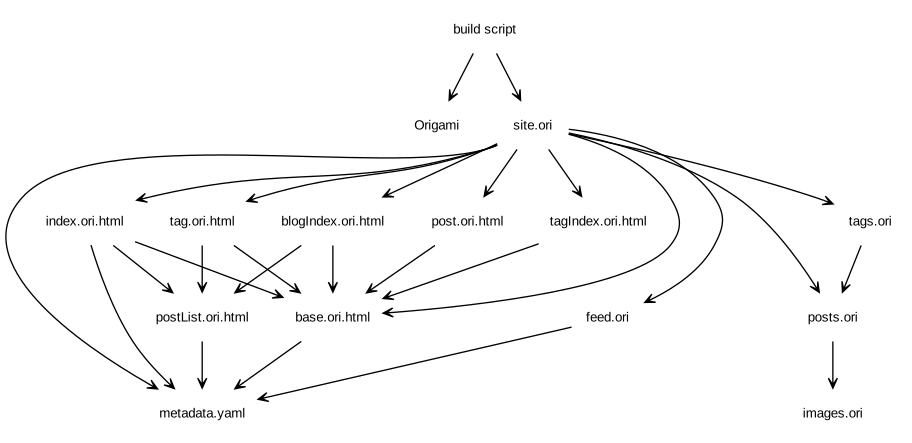
The Origami project has no hidden associations, so all the lines are solid. Everything happens because an explicit line of code makes it happen.
This property of an Origami project makes it much easier to follow what the project does. When I read someone else’s Origami project, it doesn’t matter how they’ve written it. I can always start at the build command and work forward to find all the code. The project’s author also benefits from this same guarantee when they read their own project after some time away from it.
Other posts in this series:
- Code is easier to follow than configuration [this post]
- Code is more coherent than configuration
- Code is more expressive than configuration
- Code is more concise than configuration