Code is more coherent than configuration: comparing a sample blog in Web Origami and Eleventy
This post is the second in a series comparing the same sample blog in Web Origami and Eleventy:
- Eleventy version: Source code and Demo
- Origami version: Source code and Demo
Today let’s look at how both projects define the overall structure of the site and consider whether they can present a coherent picture of what you’re building.
Like most static site generators, Eleventy leverages the tree-like structure of a folder hierarchy to approximate the tree-like structure of a site. The good news is that the file system itself gives you the best picture you’re going to get of the resulting site. That’s also the bad news.
Here’s the folder structure of this Eleventy project, including the relevant source files:
_config/
  filters.js
_data/
  eleventyDataSchema.js
  metadata.js
_includes/
  layouts/
    base.njk
    home.njk
    post.njk
  postslist.njk
content/
  blog/
    blog.11tydata.js
  blog.njk
  content.11tydata.js
  index.njk
  sitemap.xml.njk
  tag-pages.njk
  tags.njk
eleventy.config.js
The above organization alone may not mean much to the uninitiated, and sadly folders on their own can’t have comments. Nevertheless, experienced Eleventy developers can probably envision the resulting site, especially if they also scan the lengthy configuration file.
There are also many little files that configure different parts of the site’s construction, like content/content.11tydata.js:
export default {
  layout: "layouts/home.njk",
};
Most of these configuration files have no explanatory comments, by which I only conclude that we’re not expected to look at them. But if the average user isn’t expected to look at these files, why not have comments for those users that do look at them?
The above file sets a path to a Nunjucks layout, but I couldn’t see how it was used. As discussed last time, configuration-oriented tools tend toward “action at a distance” behavior that is hard to intuit. It’s also the case that there’s just not much to go on here when searching for answers.
I eventually learned that a file called content.11tydata.js is a directory-specific data file that implicitly associates its exported data with the containing folder. In this case, it defines a default layout property that will be applied as the base template for other templates in the content folder, like content/index.njk.
Most of the Eleventy configuration code feels like this. The site builds a blog as advertised, but it feels like substantial work to piece together the site’s construction to the point where you could change it.
In contrast, the premise of a coding-focused approach like Origami is that you describe what you want in code. Given that freedom, most Origami users elect to define their site’s top-level tree of resources in a single file, providing a coherent map of the project. Here’s the whole site.ori file for the sample blog:
// This file defines the structure of the entire blog site
{
  about: {
    // About page
    index.html: templates/base.ori.html(Origami.mdHtml(about.md))
  }

  // Static assets like stylesheets
  assets/

  // Blog area
  blog: {
    // Blog index page
    index.html = templates/blogIndex.ori.html(posts.ori)

    // Create a folder for each post
    ...Tree.map(posts.ori, {
      key: (post, key) => `${ key }/`
      value: (post, key, tree) => {
        // Index page for post folder
        index.html: templates/post.ori.html(post, key, tree)
        // Any associated images
        ...post.images
      }
    })
  }

  feed: {
    // Blog feed in RSS format
    feed.xml = Origami.rss(feed.ori(posts.ori))
  }

  // Home page
  index.html = templates/index.ori.html(posts.ori)

  // Tags area
  tags: {
    // Tag index page
    index.html: templates/tagIndex.ori.html(tags.ori)

    // Create a folder for each tag
    ...Tree.map(tags.ori, {
      key: (group, tag) => `${ Origami.slug(tag) }/`,
      value: (group, tag) => {
        index.html: templates/tag.ori.html(group, tag)
      }
    })
  }

  // Not Found page
  404.html = templates/base.ori.html(Origami.mdHtml(404.md))
}

// Add a sitemap for all of that
→ (site) => {
  ...site
  sitemap.xml = Origami.sitemap(site, { base: metadata.yaml/url })
}
Even if you don’t know Origami or JavaScript, you can probably squint and perceive the structure of the final site. All references here are explicit and by name.
For example, at the top you can see that the about area contains a page called index.html. The formula for that page may be unclear to you, but it contains references to the files templates/base.ori.html and about.md, so you can look at those. Even if you don’t know what something does, you at least have a name to search for. Searching the Web Origami documentation for the remaining term in that formula finds the built-in function, Origami.mdHtml.
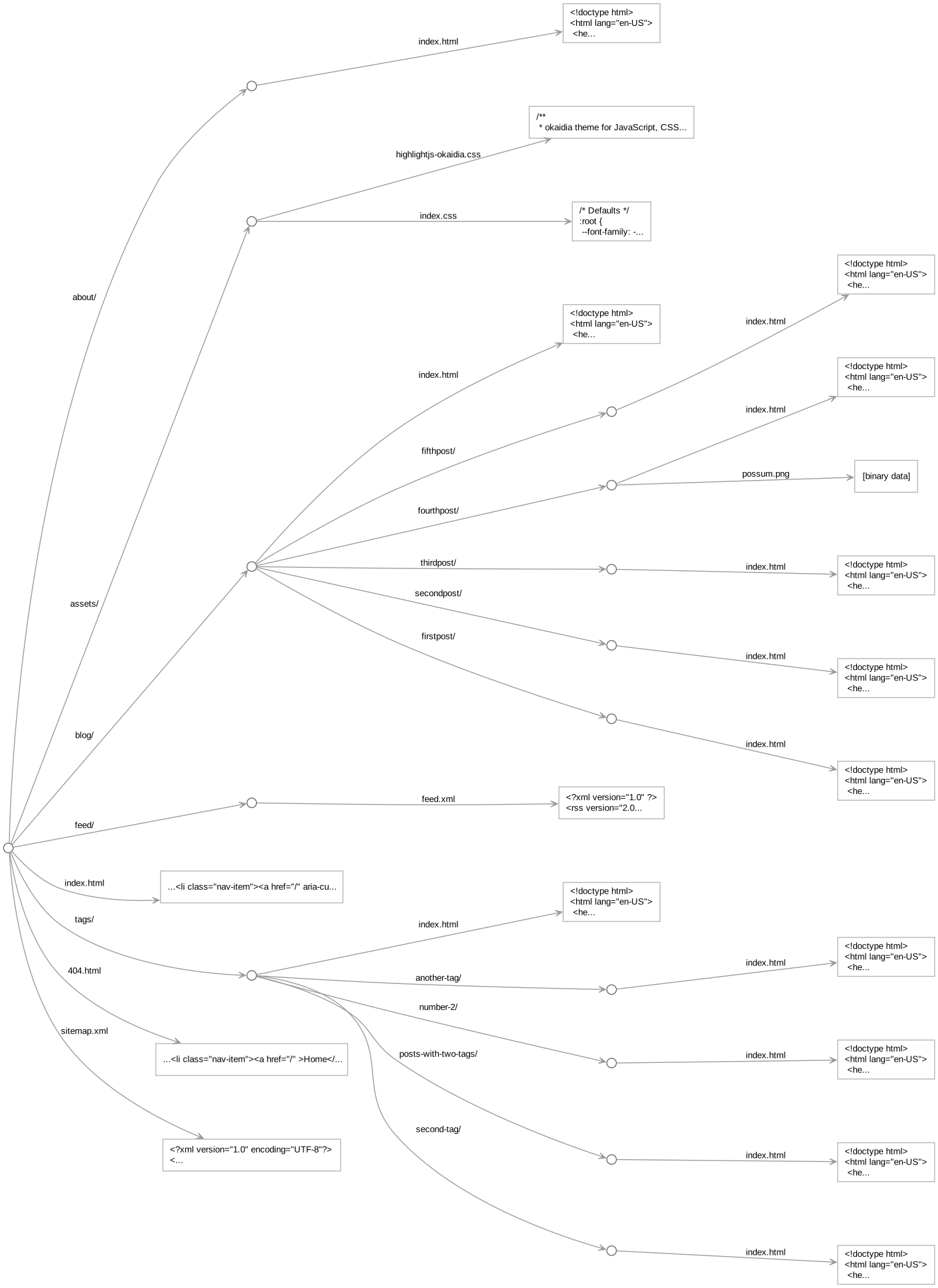
This single site.ori file pulls together the bulk of the logic behind the site. I think such a coherent, text-based map of the site is enormously helpful in understanding and remembering how the parts fit together. You can also ask Origami to draw a visual diagram of the running site to confirm your understanding.
Other posts in this series:
- Code is easier to follow than configuration
- Code is more coherent than configuration [this post]
- Code is more expressive than configuration
- Code is more concise than configuration