Code is more concise than configuration: comparing a sample blog in Web Origami and Eleventy
This post is the fourth and last in a series comparing the same sample blog in Web Origami and Eleventy:
- Eleventy version: Source code and Demo
- Origami version: Source code and Demo
As a very crude metric, the conciseness of legible code can roughly correlate with simplicity, so in this final post, let’s measure how large the projects are. That analysis is followed with an Appendix of other notes from this experiment.
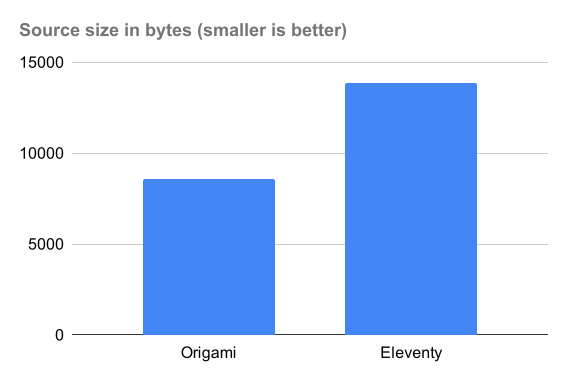
I totaled the size of all source files in each project: configuration code, data, scripts, and templates. I did not count markdown content as source code, and in any event, both projects use the same markdown.
In a code size comparison, Eleventy has latent advantages: its folder structure implicitly encodes behavior that Origami must spell out in code, and its use of configurable plugins should in theory require less code.
Counting source code in bytes (with wc -c) for Eleventy:
    2836 base.njk
      74 blog.11tydata.js
     157 blog.njk
      49 content.11tydata.js
    4610 eleventy.config.js
     475 eleventyDataSchema.js
    1380 filters.js
      54 home.njk
     864 index.njk
     294 metadata.js
    1199 post.njk
     528 postslist.njk
     519 sitemap.xml.njk
     608 tag-pages.njk
     235 tags.njk
   13882 total
And for Origami:
    1613 base.ori.html
     144 blogIndex.ori.html
     603 feed.ori
     310 images.ori
     403 index.ori.html
     243 metadata.yaml
     851 post.ori.html
     501 postList.ori.html
    1463 posts.ori
     502 readableDate.js
    1328 site.ori
     201 tag.ori.html
     251 tagIndex.ori.html
     159 tags.ori
    8572 total
The Origami version, which is doing much of the work from scratch, is smaller!
It seems Origami’s smaller size can be attributed in part to:
- JavaScript template literals (3763 bytes) are significantly more concise than the equivalent Nunjucks templates (7000 bytes). Both Origami and Eleventy let you use other template engines, so templates could be factored out of this analysis.
- JavaScript templates can inline JavaScript expressions directly instead of requiring separate registration as “shortcodes” or “filters” (see Appendix below)
- Some Eleventy files include instructional commented-out code blocks which could be trimmed
- Origami has a built-in function to create a sitemap
- The Origami site definition in
site.ori(which defines the top-level structure of the site) is 30% the size ofeleventy.config.js(which configures the main behavior of Eleventy’s static site generator).
In the domain of site creation, code is more concise than configuration.
Static site generators presume that sites are so complex that it’s better to generate a site with an engine whose behavior you configure. But sites just aren’t that complex! If you know how to write HTML and CSS, you can put together a site using zero magic. The code to do so is smaller than the configuration code required to influence a static site generator.
Speaking of metrics, performance should probably be no more than a secondary concern for you when evaluating blogging tools. Most static site generators are quite fast, especially for personal sites.
That said, I timed builds of both approaches via time npm run build on a 2024 MacBook Air M3. I threw the first (longest) time away, then averaged the real time of the next three builds.
Both Origami and Eleventy build this tiny blog project in less than a second:
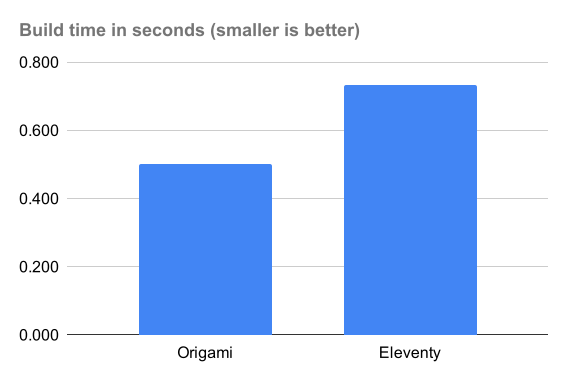
While performance shouldn’t be your primary concern, in the case of this sample blog Origami comes out ahead. It’s entirely possible that Eleventy has higher startup costs as it digs through your project looking for files, so for all I know, once those startup tasks are accomplished it could process a larger blog faster. Regardless, the performance here shows that Origami’s fundamental approach is well-suited for this task.
Conclusion
Summing up this post series, I beleive this experiment shows that an explicit, code-oriented solution like Origami is easier to follow, more coherent, more expressive, and more concise than one predicated on configuration like Eleventy. I expect the same comparison holds true for the countless other static site generators that rely on a combination of configuration, naming conventions, and folder structure.
Not every person wants to code, or has the time or energy to learn to code. But I think configuration-based site generators cover up the complexity of code with a system that is ultimately just as hard to understand. If you’re capable of configuring a tool like Eleventy, you are just as capable of coding in Web Origami.
I don’t know the Eleventy team personally, but they seem like perfectly nice people who care deeply about their users and want to create good tools for them. They also have what looks (to an outsider like me) like a dynamic, supportive user community. If you pick Eleventy for your site, it’ll probably work out fine.
If you’re interested in trying Origami for a blog, I think you’ll like it. You can start with the corresponding origami-blog-start template project. If you’re interested but want help or have questions, let me know.
Other posts in this series:
- Code is easier to follow than configuration
- Code is more coherent than configuration
- Code is more expressive than configuration
- Code is more concise than configuration [this post]
Appendix
The following are small points I noticed while studying the Eleventy blog; none are as important as the main points above.
Bugs
I found three very minor possible issues in the sample eleventy-base-blog project. Although the issues are small and debatable, any bugs in a template project will be endlessly copied into new blogs, so their potential impact is magnified.
I want Eleventy to continue growing and their new users to have great experiences, so I reported these to Eleventy (issue, issue, issue).
JavaScript as a template language
Template languages like Nunjucks are common, but they become another language you need to learn. If you already know JavaScript, that’s enough to be able to do anything you want in a template in Origami.
As a bonus, this means that you don’t have to do special things to invoke JavaScript from a template. When the Eleventy version wants to insert a timestamp onto a page, it registers a small JavaScript function as a shortcode:
eleventyConfig.addShortcode("currentBuildDate", () => {
  return new Date().toISOString();
});
This shortcode can then be called by name from a Nunjucks template:
built on {% currentBuildDate %}
In Origami, a template is a JavaScript template literal stored in its own file, so you can skip all that registration complexity above and just inline the desired JavaScript into the template:
built on ${ new Date().toISOString() }
If the code were longer, you could put it in its own JavaScript file and call that by file name. The Origami version uses that technique to implement the Eleventy readableDate function; Origami templates then call that function with
${ readableDate.js(post.date) }
Passing data to templates
A number of the Nunjucks templates in the Eleventy blog include lines like this:
{% set postslist = collections.posts %}
{% include "postslist.njk" %}
As I understand it, a Nunjucks include doesn’t let you pass data directly, so you have to pass data via what’s effectively a global variable. That approach is so fraught with the high potential for errors that it’s hard for me to recommend any system that requires it. (Eleventy allows the use of template engines other than Nunjucks; perhaps those are better.)
Origami templates are functions, so you can pass data to them directly:
${ postList.ori.html(posts) }
Focusing on representing pages
Blogging tools like Eleventy use a project’s folder structure to determine the resulting site structure. That approach focuses on complete file resources, such as a page for an individual post.
But blog posts in this project actually have three representations:
- The post page in the
blogarea - A post entry in lists of posts: home page,
blog/index.html, and tag pages - A post entry in the feed at
feed/feed.xml
The folder structure only gives you a way to conveniently express the first representation. The Origami code doesn’t have any particular focus on pages; all post representations can be defined in a variety of ways.
Meanwhile, using folder structure to represent site structure has limits. It took me a while to realize that the single file tag-pages.njk isn’t just a template for a tag page; an embedded block of JavaScript at the top of the file appears to also generate the collection of pages like tags/second-tag/index.html.
In contrast, the Origami site.ori file includes an explicit definition of the tags area.
Inlining CSS
The Eleventy blog inlines the main CSS stylesheet into every page instead of linking to it. Origami can easily do both, but as a matter of preference, I had the Origami version link to the main stylesheet. Among other things, that keeps each built page smaller and easier to read.
Navigation links
The Eleventy version uses an Eleventy navigation plugin. I’m probably missing something, but in this project it looks like the plugin is used to add an aria-current attribute to three links.
Perhaps in other contexts the plugin saves time, but here it seems like overkill. I implemented this in the Origami version by adding conditions to the three links in question:
${ _.area === "Home" ? `aria-current="page"` : "" }
This does the job, and is a lot easier for me (someone familiar with JavaScript) to understand. This could be scaled up into a helper function if necessary.
HTML rewrites
I was baffled by this template fragment in the Eleventy version:
Go <a href="index.njk">home</a>.
I just couldn’t figure out what this was doing — what would it even mean to navigate to a Nunjucks template? Looking at the running site, I could see that the link was magically being rewritten. But even closely reading the project’s source code couldn’t help me see how or why this was happening.
Claude Code identified this fragment as something handled by the Eleventy InputPath to URL plugin.
Some people love such magic; I’m not one of them.
Sitemaps
The original Eleventy project defined a sitemap.xml file so I implemented one for the Origami version. That said, a sitemap seems unnecessary for this blog; all the content is trivially discoverable by a search engine. The code to generate the sitemap ends up being both a distraction and a possible maintenance burden.
Plugins are general features bound to specific projects
The original Eleventy blog uses a number of plugins to:
- Rewrite URLs to inject a path prefix
- Generate ID attributes for heading elements
- Transform input file paths to output URLs
- Optimize images
- Help construct navigation elements
- Define an RSS feed
- Apply syntax highlighting to blocks of code in posts
All these tasks performed by the Eleventy plugins have one thing in common: the tasks have nothing to do with Eleventy. Every one of them is something you might want to do on any static site, regardless of which tool you’re using to make it.
It’s in the nature of tools with proprietary interior workings to require tool-specific plugins. The lost opportunity is that, instead of sharing general-purpose code that can work with many tools, we collectively waste time rewriting the same ideas over and over for different tools.
Extensibility in Origami is provided by calling functions that can be written as generally as possible. There are no internal data structures that require proprietary plugins to manipulate. As the creator, your own code generates the requisite objects; you can pass those directly to third-party functions.
The aforementioned Origami package for turning a data object into an RSS feed is a plain JavaScript function that has nothing to do with Origami at all. Other Origami packages are written around the use of the standard Map class as the basis for tree structures, an approach that’s at least theoretically adoptable by other tools.